> ## Documentation Index
> Fetch the complete documentation index at: https://docs.usepropane.ai/llms.txt
> Use this file to discover all available pages before exploring further.
# Welcome to Propane
> Turn customer evidence into product decisions with Spaces, AI chat, canvas, and research agents
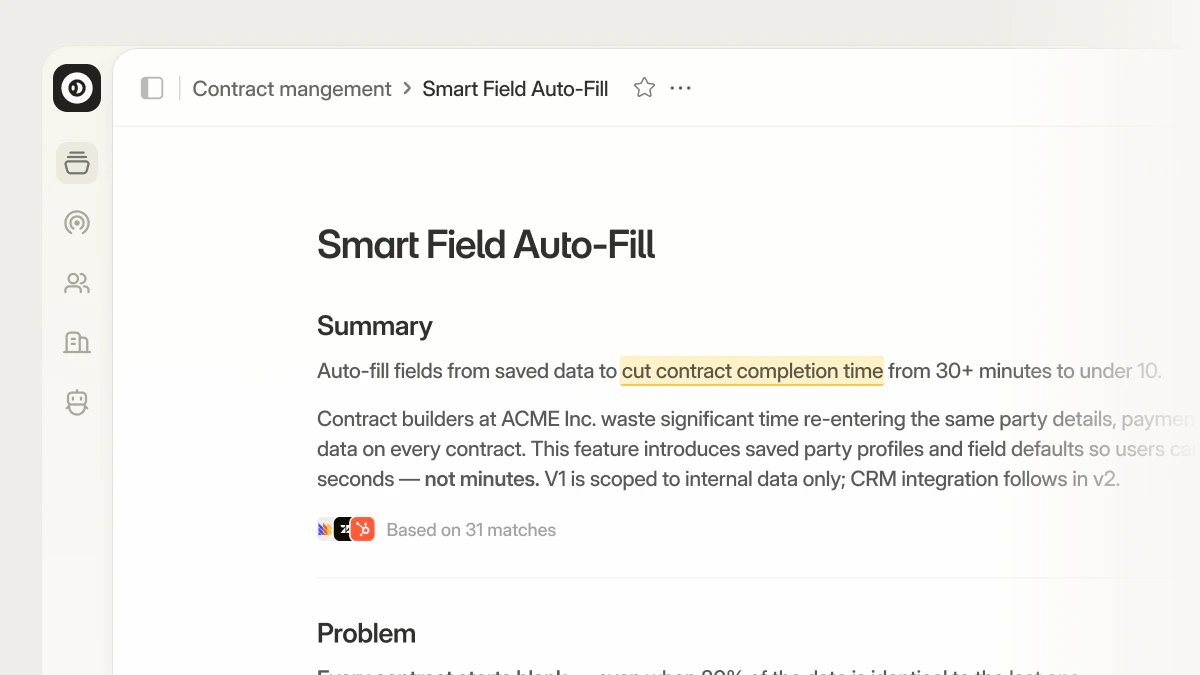
Propane helps your team **turn customer evidence into product decisions**. The product has two layers. **Workspace** is free and open to everyone — **Spaces** for your projects, **Canvas** for documents that can call agents inline, **AI chat** across your sources, and **handoff to coding agents** when an idea is ready to ship.
 Create your account, connect data, and build your first canvas
Spaces, chat, Signals, Connectors, and Integrations
Support and next steps when you are stuck
## Product workflows
Most work in Propane happens in **Spaces** and on the **canvas** — shared workspaces and a live document you shape with AI and your team.
**Spaces** group canvases and output by product area or initiative. [Create a Space](/spaces/create-space), [collaborate with your team](/spaces/collaborate) in real time, and manage the lifecycle of a Space when you are done — see [Delete a Space](/spaces/delete-space) when you need to remove one.
The **canvas** is where ideas become a structured document: you chat with the AI, approve a plan, and refine the canvas in place. Start with [Create a canvas](/canvas/create-canvas) and [Starting a session](/chat/starting-a-session), then dive into [Editing the canvas](/canvas/editing), [real-time collaboration](/canvas/real-time-collaboration), and [Version history](/canvas/version-history) as your work evolves.
## Next steps
The first three steps cover **Spaces**, the **canvas**, and bringing **customer data** into your work. Steps 4–7 are **optional** and focus on **research agents** (Growth): use them when you want to run structured sessions with participants beyond working with the AI on the canvas alone.
[Sign up](https://app.usepropane.ai/signup) and complete [Set up your workspace](/getting-started/setup-workspace) if you have not already, or see [Choose your path](/getting-started/choose-your-path). Then [create a Space](/spaces/create-space) and start adding content to it.
You land on the canvas inside your Space. Use chat to shape the plan and document — see [Starting a session](/chat/starting-a-session) and [Editing the canvas](/canvas/editing). You can also [paste or upload material](/chat/uploading-files) to bring context into the session.
**Connectors (MCP)** — Authenticate your own tools and pull live context into a session. See [Connectors](/settings/connectors). **Integrations** — Connect org-wide sources where customer evidence lives so your whole team benefits; available on the **Growth plan**. See [What integrations bring in](/context/integrations/what-they-bring-in).
### Research agents (optional)
These steps require the **Growth plan**. Skip them if you only need **Spaces**, **canvas**, and **chat** — you do not have to create a research agent to get value from Propane.
On the Growth plan, open **Agents** and [create a research agent](/interviews/create-interview). Choose templates like NPS follow-ups, Win/Loss, Churn Analysis, or custom templates.
[Add participants](/interviews/adding-participants) manually, via CSV, or from People — then send invitations or copy session links.
Use [email and links](/distribution/email-link-distribution) or [embed a research agent](/distribution/embed-interview) on your site.
Review AI-generated insights and dive into individual responses to understand your users better.
Create your account, connect data, and build your first canvas
Spaces, chat, Signals, Connectors, and Integrations
Support and next steps when you are stuck
## Product workflows
Most work in Propane happens in **Spaces** and on the **canvas** — shared workspaces and a live document you shape with AI and your team.
**Spaces** group canvases and output by product area or initiative. [Create a Space](/spaces/create-space), [collaborate with your team](/spaces/collaborate) in real time, and manage the lifecycle of a Space when you are done — see [Delete a Space](/spaces/delete-space) when you need to remove one.
The **canvas** is where ideas become a structured document: you chat with the AI, approve a plan, and refine the canvas in place. Start with [Create a canvas](/canvas/create-canvas) and [Starting a session](/chat/starting-a-session), then dive into [Editing the canvas](/canvas/editing), [real-time collaboration](/canvas/real-time-collaboration), and [Version history](/canvas/version-history) as your work evolves.
## Next steps
The first three steps cover **Spaces**, the **canvas**, and bringing **customer data** into your work. Steps 4–7 are **optional** and focus on **research agents** (Growth): use them when you want to run structured sessions with participants beyond working with the AI on the canvas alone.
[Sign up](https://app.usepropane.ai/signup) and complete [Set up your workspace](/getting-started/setup-workspace) if you have not already, or see [Choose your path](/getting-started/choose-your-path). Then [create a Space](/spaces/create-space) and start adding content to it.
You land on the canvas inside your Space. Use chat to shape the plan and document — see [Starting a session](/chat/starting-a-session) and [Editing the canvas](/canvas/editing). You can also [paste or upload material](/chat/uploading-files) to bring context into the session.
**Connectors (MCP)** — Authenticate your own tools and pull live context into a session. See [Connectors](/settings/connectors). **Integrations** — Connect org-wide sources where customer evidence lives so your whole team benefits; available on the **Growth plan**. See [What integrations bring in](/context/integrations/what-they-bring-in).
### Research agents (optional)
These steps require the **Growth plan**. Skip them if you only need **Spaces**, **canvas**, and **chat** — you do not have to create a research agent to get value from Propane.
On the Growth plan, open **Agents** and [create a research agent](/interviews/create-interview). Choose templates like NPS follow-ups, Win/Loss, Churn Analysis, or custom templates.
[Add participants](/interviews/adding-participants) manually, via CSV, or from People — then send invitations or copy session links.
Use [email and links](/distribution/email-link-distribution) or [embed a research agent](/distribution/embed-interview) on your site.
Review AI-generated insights and dive into individual responses to understand your users better.